back to overview
  More blogs
 Your VPN says you are in Frankfurt. The site you just opened is not convinced, and it did not have to guess. Somewhere between your new IP address and your old browser there is a contradiction, and finding contradictions is the whole job of a detection system. The panel on this page runs the same comparisons against your browser right now.
The confusion starts with what a VPN actually does. It encrypts your traffic and hands it to the internet from a different address. That is all. It does not change the clock in your operating system, the languages your browser asks for, the shape of your TCP packets, or the fact that the new address belongs to a company that rents servers. A site that wants to know reads those, and they agree with each other and not with the IP.
Your new IP comes with a label on it
Every public IP address belongs to an autonomous system, a block of addresses registered to one organization, and that registration is public. Your home connection comes out of a range owned by Comcast, Vodafone or Ziggo. A VPN exit comes out of a range owned by M247, DataCamp, Leaseweb or whoever the VPN provider rents racks from, and the same lookup that tells a site your country tells it that too, in the same response, as org or asn. The homepage scan shows you the line; it is the “network operator” row in the panel above.
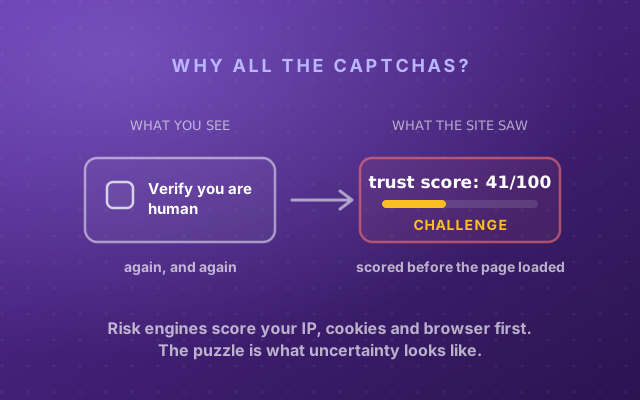
Nothing about that lookup is clever. Consumer ISPs hand out addresses to people; hosting companies hand them out to machines. An address from the second group that is browsing a shop, logging into a bank or streaming a series looks odd before anything else is checked, and fraud engines weight it accordingly. It is the same signal we described in why you keep getting CAPTCHAs, because it is the same engine asking.
Reputation lists already know the VPN ranges
Above the ASN sits a second layer: commercial IP reputation databases. IPQualityScore, ipinfo’s privacy detection, IP2Proxy, Spur and a dozen others classify every range as residential, business, hosting, proxy, VPN or Tor, and the lists are not hard to build. VPN providers publish their server lists so their own apps can connect. Hosting ranges are in the registries. Abuse reports and sheer density do the rest: a residential address has a handful of people behind it, a popular VPN exit has hundreds at once, across every time zone, and that pattern is visible from the traffic alone. The “IP reputation list” row in the panel asks one such database about your address.
This is why the big streaming services are so good at it. They do not detect your VPN app; they keep a list of addresses that behave like VPN exits and refuse those. It is also why a VPN that works today stops working next month: the range got listed.
- Who owns that IP range the connection now says "server"
- Reputation lists the connection now says "server"
- TCP fingerprint (MTU, TTL) the connection now says "server"
- Which DNS resolver you use the connection unchanged, still says home
- Time zone your browser unchanged, still says home
- Browser languages your browser unchanged, still says home
- WebRTC address your browser unchanged, still says home
- Browser fingerprint your browser unchanged, still says home
The browser keeps telling the truth
Everything so far was about the address. The rest is about the browser, and this is the part most VPN guides skip, because no VPN fixes it.
Time zone. Your operating system clock says Europe/Amsterdam and JavaScript reads it with one call, no permission prompt. A German IP with a Dutch clock is a contradiction a site can check in a millisecond, and we wrote a whole post on why the VPN can’t fix the time zone.
Languages. Every request your browser makes carries an Accept-Language header, and navigator.languages says the same thing to scripts. A VPN does not touch either. nl-NL from a German address is the same contradiction in a different column; the language leak post covers it, including the case where it is only a weak signal, like an English-only browser abroad.
WebRTC. Browsers can ask a STUN server “what is my public address?” to set up a call, and some VPN setups let that question bypass the tunnel. The answer is your real address, sitting next to your VPN address on the same page. That is the WebRTC leak, and the panel above runs the check.
Geolocation and IPv6. If you ever granted a site location access, the browser’s position comes from GPS or nearby Wi-Fi and does not move with the VPN. And a VPN that only tunnels IPv4 leaves your IPv6 address, issued by your home ISP, available to any site with an IPv6 endpoint.
- IP location
- Frankfurt, DE moved by the VPN
- Network owner
- M247 Europe (hosting) a server rack, not a living room
- Browser time zone
- Europe/Amsterdam contradicts the IP
- Browser languages
- nl-NL, en contradicts the IP

None of this requires knowing what a VPN is. A detector does not think “VPN”; it thinks “this visitor’s signals disagree”, and disagreement is what gets scored.
The signals no web page can read
Two more checks happen below the browser, and they matter because they are how a clean browser on a residential exit can still be caught.
The TCP fingerprint. A VPN tunnel wraps your packets inside its own, so the packets that reach the site are slightly smaller than a normal connection’s (the maximum segment size shrinks by the tunnel’s overhead) and their time-to-live has spent an extra hop. Passive fingerprinting tools in the p0f family read those fields off the server’s network card before your first request is answered, and “MSS 1360 from an address that claims to be a home router” is a known shape.
DNS. When your browser resolves a hostname, some resolver somewhere sends that query to the site’s DNS server. If that resolver belongs to your home ISP while your web traffic arrives from a VPN exit in another country, the site has two addresses for you again. Leak tests make your browser resolve a unique hostname and watch which resolver shows up; that is how a VPN app’s “DNS leak protection” setting gets tested.
Why obfuscated mode does not help here
VPN apps sell “stealth” or “obfuscated” servers, and they solve a real problem: getting VPN traffic past a network that blocks it, by making the tunnel look like ordinary HTTPS to the firewall in between. That is a fight with your ISP or your office network. The website at the other end never sees the tunnel. It sees the exit address and your browser, both exactly as readable as before. Obfuscation and detection are two different problems, and the marketing merges them.
What to actually do
- Run the test, then fix what it flags. The panel at the top of this page is a fair approximation of what a site sees; the full browser scan adds the fingerprint and leak checks around it. A tell you find yourself is a tell you can fix.
- Make the browser agree with the address. Match the time zone and language to the exit country, or pick an exit in your own country if the point is privacy rather than geography. Turn off WebRTC or let the VPN app handle it. A consistent story from a datacenter IP scores better than a contradictory one.
- If you need to look like a person, use a person’s address. Datacenter ranges are listed and stay listed; dedicated or residential IPs are the only way off that list. Whether that is worth it depends on what you are doing.
- If you run several identities, separate them completely. Every profile needs its own exit address and a browser whose clock, languages and fingerprint match that address, or the contradictions above reappear per account. That is what anti-detect browsers are for. Incogniton ties a proxy to each profile and sets the time zone and language to match it, so the browser and the address tell one story instead of two.
A VPN is still the right tool for what it was built for: encrypting your traffic on networks you do not trust, and moving your address. The IP address, that is: your MAC address was never visible to websites in the first place. It was never built to make a browser lie convincingly, and most of the detection above is just the browser telling the truth.