back to overview
  More blogs
 Somewhere in every thread about a banned account, someone gives the same advice: change your MAC address, that is how they know it is you. It sounds right. The MAC address is burned into your network card at the factory, it is globally unique, and it feels like exactly the identifier a website would grab first.
It is also the one identifier a website cannot get. The reason sits below anything a site controls: your MAC address never travels past your own router, and nothing inside a browser will hand it over. The widget on this page tries anyway, and shows what a site sees instead.
Your MAC address gets off at the first hop
A MAC address answers one question: which network card on this network should receive this frame? When your laptop sends a request to a website, it wraps the packet in a frame stamped with your MAC as the source and your router’s MAC as the destination. The router strips that frame off, keeps the packet, and builds a fresh frame for the next leg with its own address as the source. Every router between you and the server does the same thing again. By the time your request arrives, the source MAC on it belongs to whatever router sits closest to the server. Yours never made it out of your living room.
- Your devicewraps the request in a frame addressed to the routersrc MAC
3C:22:FB:9A:41:D6yours - Your router your MAC's last stopstrips the frame and builds a new one for the next hopsrc MAC
9C:53:22:71:0B:E4the router's - Your ISP, and every router after iteach hop repeats the rewrite with its own addresssrc MAC
…whichever router forwarded last  The websitereceives your public IP address and your request headersyour MAC: not in the packet
Can JavaScript get your MAC address?
No, and this end is just as closed as the network end. The browser will tell any script your language and your CPU core count through navigator, and WebGL will volunteer your GPU model, all without a permission prompt, but nothing MAC-shaped exists anywhere in the web platform. “Get MAC address from JavaScript” has had the same Stack Overflow answer for nearly two decades: you can’t, and the people asking are told to generate their own identifier instead.
Why old forum answers say a website can read it
Search this question and you will still find answers claiming a site can read it, given the right “special scripts” on its servers. Those answers were written in a different browser. In the plugin era, a signed Java applet could call NetworkInterface.getHardwareAddress() and an ActiveX control in Internet Explorer could simply ask Windows. That entire class of hole is gone: Chrome dropped plugin support in 2015, Firefox in 2017, and Internet Explorer itself was retired in 2022. Nothing a modern browser runs gets that kind of reach into the operating system.
The other ghost is IPv6. The original addressing scheme built your public IPv6 address partly out of your MAC, a format called EUI-64, which meant your hardware address literally shipped inside every packet. That was recognized as a privacy hole almost immediately: privacy extensions fixed it (RFC 3041 in 2001, refined into RFC 4941), and every mainstream operating system has defaulted to randomized addresses for years. Both the direct read and the indirect leak are closed; the forum posts saying otherwise are simply older than the fixes.
Who can see your MAC address (and why your phone lies to them)
Your MAC is entirely visible on the network you are connected to. Your router logs it, every device on the same Wi-Fi can see it, and so can whoever runs that Wi-Fi: your employer, the hotel, the airport, the coffee shop. When a hotel login page greets you by device, that is the network’s gateway handing its own knowledge to its own portal, not your browser giving anything up. That is a real tracking surface. Retail analytics firms used to follow phones through shopping malls by the Wi-Fi probes they broadcast, which is why the OS vendors moved. iOS 14 started giving each Wi-Fi network its own “private address” in 2020, Android 10 made per-network randomization the default, Windows offers random hardware addresses per network, and macOS caught up in Sequoia. Apps lost access even earlier: since iOS 7 an app asking for the MAC gets 02:00:00:00:00:00 back, and Android 6 pulls the same trick. The famous exception was TikTok, which the Wall Street Journal caught collecting MAC addresses on Android for at least 15 months through a workaround that dodged the Android 6 block: an app abusing OS access, not a website reading your browser.
All of that protects you from the network operator, not from websites. Websites never had the address to begin with.
Does a VPN hide your MAC address?
No, and it does not need to. A VPN encrypts your traffic and swaps the IP address the internet sees. Your MAC lives on the segment between your laptop and your router, before any of that happens, and it goes no further with or without the tunnel. Your router sees your MAC either way; the website sees it neither way. If a VPN provider advertises MAC protection as a feature, they are protecting you from something that was not happening.
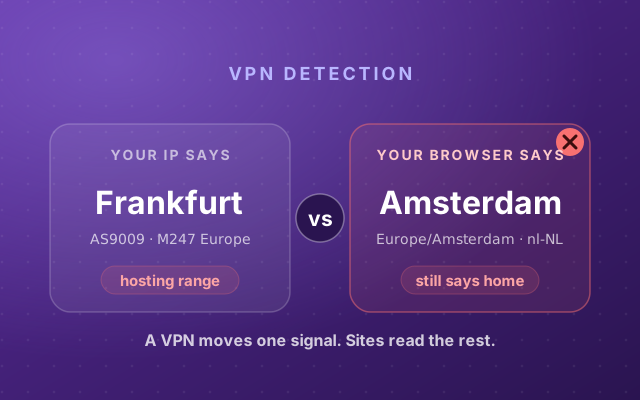
What websites can work out about VPN users is real; the leaks just live elsewhere: the time zone, the languages, the IP range’s owner. We took that apart in how websites detect your VPN.
What a “device ban” actually pins to
Which brings us to the reason most people ask about MAC addresses at all: a platform said your device was banned, and the MAC is the most device-sounding thing you know the name of. Snapchat’s SS06 “device banned” screen, Roblox’s device blocking, a forum ban that survives a new account. If the site cannot see your MAC, what did it grab?
On the web, three things. A stored identifier: some cookie or localStorage value written long before the ban, which survives logging out. Your IP address, or the whole range it belongs to. And your browser fingerprint: the canvas hash, the font list, the GPU string, the time zone, combined into an identifier that needs no storage at all. The three have very different lifespans, which is exactly why platforms use all of them at once. It is also why there is no single answer to how long a device ban lasts: the cookie half dies when storage is cleared, the IP half when your address rotates, and the fingerprint half only when the browser or hardware underneath it changes.
- websites: blindMAC addressnever leaves your local network, and there is no browser API
- websites: blindHardware serials (HWID)read by kernel anti-cheat inside games, never by a web page
- websites: blindPhone device IDshanded to native apps by the OS; what a Snapchat ban uses
- websites read itIP addresson every request; changes with the network you are on, or a VPN
- websites read itCookies and site storagesurvives logging out; cleared in browser settings
- websites read itBrowser fingerprintsurvives clearing storage and switching IPs
Native apps and games play a different sport, and the two get mixed up constantly. A phone app gets platform device IDs and attestation from the OS, which is the kind of thing a Snapchat device ban leans on. PC games with kernel-level anti-cheat, Vanguard, Easy Anti-Cheat, BattlEye, read motherboard and disk serials from inside the operating system: that is a real HWID ban. A web page can do none of this. A website asking for your GPU model string is already at the ceiling of what it will ever learn about your hardware, and even that arrives as part of the fingerprint surface, not as a serial number.
What to actually do
- Stop solving the MAC problem for websites. There is nothing to solve. If a site keeps recognizing you when you think it should not, the recognition lives in storage, your IP, or your fingerprint, and the full browser scan shows you which signals your browser is giving away.
- Turn on MAC randomization for networks you do not own. That is the threat the feature was built for, it costs nothing, and on a current phone it is probably already on.
- If you run multiple accounts for work, the fingerprint is the part that actually links them, and patching it by hand creates the contradictions that detection systems hunt for. Incogniton gives each profile its own consistent fingerprint and storage, which is the layer where separation really happens, no MAC changer involved.
Whether a given platform allows any of that is set by its rules, so know them before you act. But whatever you decide, decide it about the identifiers a website can actually read. The widget above lists every one of them, and the MAC address row is the one no page will ever fill in.