back to overview
  More blogs
 At some point in the last year the internet started asking you to prove you are human several times a day. Traffic lights, crosswalks, a spinning checkbox before a shop will show you a price. Google interrupts a search to report “unusual traffic from your computer network.” You didn’t change anything, and suddenly you are on the wrong side of every door.
Here is what actually happened: before each of those pages loaded, a risk engine scored your visit, and your score came in low. The CAPTCHA is not the site being careful. It is the site being unsure about you specifically.
A CAPTCHA is a verdict about the middle
Modern anti-bot systems decide before they ask. Google’s reCAPTCHA v3 gives every request a score between 0.0 and 1.0 and never shows a puzzle, not even the “I’m not a robot” checkbox its older sibling v2 is famous for; the site picks a threshold and quietly acts on it. Google’s own documentation is blunt about it: the score is based on how you interact with the site, not on solving anything. Cloudflare’s “verify you are human” box (powered by the same technology as its Turnstile widget) runs on the same logic: check the browser, check the connection, and pass most visitors with nothing to solve at all. hCaptcha, the third vendor you’ll run into, scores risk the same way.
The puzzle is what uncertainty looks like: confident-human traffic never sees it, confident-bot traffic gets a block page, and everyone the engine can’t place gets to click bicycles. “Why do I keep getting CAPTCHAs” really means “why does every risk engine file me under unsure”, and that has a small set of causes you can actually check.
The usual suspect: your IP’s reputation
Risk engines keep books on the internet’s address space. A request from a Comcast or Vodafone range with years of boring residential history starts near the top. A request from a datacenter range starts near the bottom, because that is where scrapers live, and the engine has already met thousands of them on your exact IP.
This is why the CAPTCHAs follow you from site to site. The score isn’t attached to your account or your browser; it is attached to the address every one of those sites sees you arrive from.
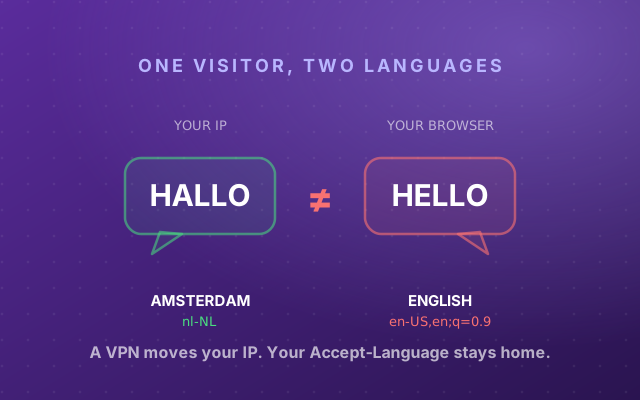
The classic case is a VPN: your traffic exits from a hosting range shared with hundreds of strangers, and it only takes a few of them running bots to sour the address for everyone. Some exits are clean, some are radioactive, which is why switching servers sometimes fixes everything. How sites recognise those ranges, and what else gives a VPN away, has its own post: how websites detect your VPN.
The widget on this page shows whose name your connection answers to right now. If that name is a hosting company or a VPN brand rather than an ISP you pay a monthly bill to, you have probably found your cause.
Why it happens on your phone and iPhone
Mobile carriers put enormous numbers of customers behind one public address (carrier-grade NAT), so one abuser can poison the address for a small town’s worth of people. That is the honest answer to “why do I get CAPTCHAs on my phone”: nothing about your phone, everything about who you share its address with.
iPhones add a second layer. Safari with iCloud Private Relay browses from shared egress addresses operated by Apple’s content-provider partners (Cloudflare, Akamai and Fastly), and some sites treat those like any other proxy range. Turning Private Relay off for a problem site is a quick way to test whether it is the cause.
Google’s “unusual traffic from your computer network” message
Google’s version of the wall is volume-based: it fires on the query patterns of your whole IP address, which on shared addresses usually means someone else’s queries. Google’s support page also names the possibility people forget: malware. A single infected device on your network, quietly sending automated searches, sours the address for every browser behind it. If the message keeps coming back on a home connection, scan your devices, then power-cycle the router — many ISPs will hand you a fresh dynamic IP, which resets the address’s reputation outright.
Your browser is your character witness
The second half of the score is the browser itself, and here the painful irony kicks in: the harder you work to be private, the more anonymous-shaped you become.
A browser that keeps its cookies has a history: sites it visited, challenges it already passed. Clear them on every close, or live in incognito, and you introduce yourself as a stranger at every door, every day. Strangers get carded. reCAPTCHA in particular leans on recognizing returning browsers, which is why the puzzle streak so often starts right after switching to incognito.
Privacy extensions can make it worse in a different way. Tools that spoof your canvas readout or randomize your fingerprint do it by rewriting the browser’s built-in functions, and rewritten built-ins are detectable, the same tell that exposes automation stealth plugins. To a risk engine, an API that lies is worse than an API that says something unpopular. And if your User-Agent claims one browser while the engine underneath is plainly another, you’ve manufactured the exact contradiction we covered in Your User-Agent Lies.
None of these signals condemns you on its own; they add up:
Toggle the flags a risk engine might see in your visit:
One flag usually lands you in puzzle territory. A second tends to drop you past it, onto the block pages and into the endless loops. The fix is rarely “do more”; it is finding which flags you’re raising and lowering them.
The endless “verify you are human” loop
The nastiest version of this is the challenge that never ends: you click the checkbox, the page reloads, and the checkbox is back. Solving a Cloudflare challenge earns you a clearance cookie (cf_clearance), which is how the site remembers you passed. If your browser can’t keep that cookie — cookies blocked for the site, an extension that shreds them, a setting that wipes them on the spot — your pass is forgotten before the page finishes loading, and you arrive at the next request as a brand-new suspect:
The loop is amnesia, not punishment: without that cookie, the site meets you for the first time on every request. If you’re stuck in one, the cookie is the first thing to check, and the widget above checks it.
Why everyone is suddenly seeing more CAPTCHAs
Automated traffic passed human traffic in 2024: Imperva’s Bad Bot Report measured automated traffic at 51% of all web traffic, with AI scrapers and bots doing much of the pushing. Sites responded by turning their risk thresholds up. A stricter threshold widens the uncertain middle, and the uncertain middle is where the puzzles live. The bots that caused the crackdown mostly don’t see the CAPTCHAs; the humans with slightly odd setups do.
How to stop getting CAPTCHAs: find your tell, then fix it
- Read the widget on this page. It names your network operator and checks the browser-side flags: cookie storage, the automation flag, tampered APIs. A datacenter name at the top is an IP problem; anything else it flags is a browser problem.
- Isolate the IP variable. If you’re on a VPN, load the same site without it (or from your phone on mobile data) and compare. If the CAPTCHAs vanish, the exit address was the cause — switch servers or providers rather than abandoning the VPN. On a home connection with no VPN, power-cycling the router often pulls a fresh IP from your ISP.
- Watch yourself the way a detector does. The live behavior monitor on our homepage scores your cursor physics and click provenance in real time, and the full browser scan runs the fingerprint and leak checks alongside it. If a site has told you outright that your reCAPTCHA score is too low, our reCAPTCHA score guide explains the number and lets you check your own.
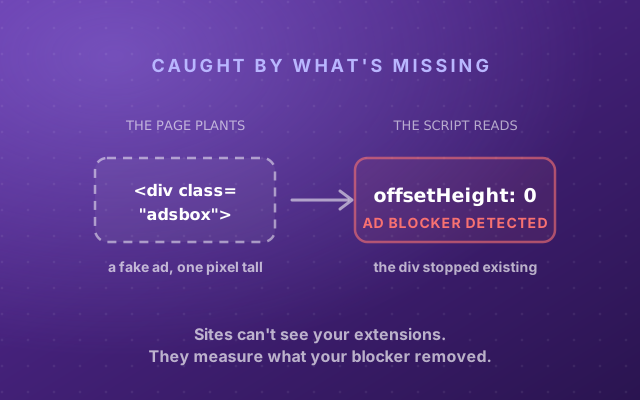
- Stop looking disguised. Let sites you trust keep their cookies, keep the browser current, and prefer one honest fingerprint over a patchwork of spoofing extensions that each leave fingerprints of their own. Even an ad blocker is detectable, and the specific way yours blocks joins your profile.
- Running multiple accounts? Then your problem is consistency at scale: every profile needs its own believable IP and a fingerprint that stays self-consistent, or each one inherits the others’ reputation. That is the specific job Incogniton is built for: real, separate browser profiles that risk engines can score individually instead of collectively.
The next time a checkbox demands proof of humanity, you’ll know what it is actually weighing: whether your IP, your cookies and your browser agree with each other. Make them agree, and the puzzles go back to being something that happens to other people.