back to overview
  More blogs
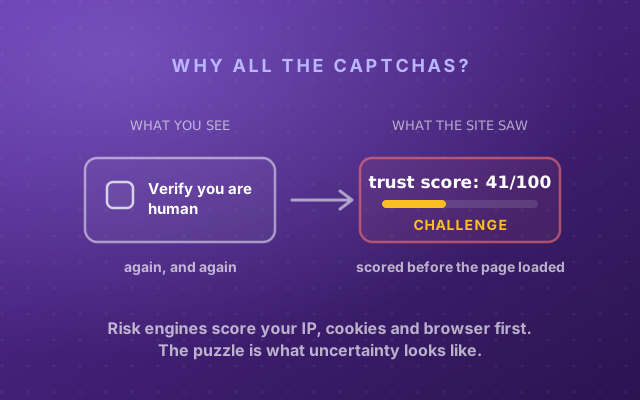
 You typed your password, clicked Log in, and the site answered with a sentence that explains nothing: “reCAPTCHA score too low.” Or a survey platform closed the door on you after the first page. There was no puzzle, so there is nothing to solve better. The verdict was in before you clicked.
Here is what happened. The page was running Google’s reCAPTCHA v3 in the background. When you pressed the button, the script handed the site a token, the site’s server asked Google what it thought of you, and Google answered with a number between 0.0 and 1.0. The site compared that number with a cutoff, usually 0.5, and you came in under it. You were never shown the number. The button at the top of this page will show it to you.
What the reCAPTCHA score actually is
reCAPTCHA v2 is the checkbox and the traffic lights. reCAPTCHA v3 is the version you never see: it runs while the page loads and, in Google’s words, “returns a score (1.0 is very likely a good interaction, 0.0 is very likely a bot)“. The score is based on “interactions with your site”, and Google is explicit that the model “learns by seeing real traffic on your site”.
The scale is coarser than it looks. Google’s assessment documentation describes eleven levels from 0.0 to 1.0, but until a project adds a billing account only four of them are available: 0.1, 0.3, 0.7 and 0.9. Most small sites run on those free keys, so in practice there are four verdicts: 0.9 you look human, 0.7 you probably are, 0.3 you look suspicious, 0.1 you look like a script. There is no 0.5 for a free key to hand out. When a site tells you your score is too low, it is nearly always holding a 0.3 or a 0.1. Sites on a billed tier (Google’s Premium and Enterprise tiers, the product it used to sell as reCAPTCHA Enterprise) see all eleven levels, so 0.4 and 0.6 exist there: 0.6 clears a 0.5 cutoff, 0.4 does not.
The score never enters your browser. Your browser only ever holds a token, an opaque string that is valid for two minutes and can be verified once. The site sends that token to Google from its own server, with its secret key, through the classic siteverify call or the newer assessment API, and gets the score back privately.
- 1Your browserRuns the reCAPTCHA script, which watches the page and your input, then receives a token: an opaque string, valid for two minutes. No score inside.the score never enters the browser
- 2The site's serverGets the token with your form and forwards it to Google along with its own secret key.
- 3GoogleAnswers with the score, 0.0 to 1.0, and on billed tiers a reason code. The token is now used up.
- 4The siteCompares the score with its cutoff. At or above: you are in. Below: "reCAPTCHA score too low".
That design is why no browser setting, extension or console trick can show you your score, and why every “check your reCAPTCHA score” page, including this one, has to run a server to ask Google on your behalf.
What is a good reCAPTCHA score? The 0.5 threshold
The cutoff is the site’s, not Google’s. Google’s default is one sentence, “By default, you can use a threshold of 0.5”, and most integrations leave it there. Qualtrics, the survey platform whose bot screen-outs send a lot of people searching for this, stores the number in a field called Q_RecaptchaScore and tells researchers that 0.5 or more “means the respondent is likely a human” and anything below “is likely a bot”. Login forms at hosting panels, crypto platforms and game launchers use the same rule and the same error message, sometimes shortened to “captcha score too low”. Some researchers set the bar at 0.7, and Prolific’s own help centre warns them that this throws out real participants on older devices, shared computers and methodical reading habits.
Read as a ladder, the usual interpretation looks like this. Google itself only defines the two ends; the bands are how sites read the middle:
| Score | How sites read it | At the default 0.5 cutoff |
|---|---|---|
| 0.9 to 1.0 | very likely human | in |
| 0.7 to 0.8 | probably human | in |
| 0.5 to 0.6 | uncertain | in, just |
| 0.3 to 0.4 | suspicious | "score too low" |
| 0.0 to 0.2 | looks automated | "score too low", often blocked outright |
What happens below the cutoff is the site’s choice too: some refuse outright with “score too low”, some hold the form for a human to review, and some fall back to a v2 checkbox or image puzzle. Try the cutoffs a site might choose and watch which of the four free-key scores survive:
Pick the cutoff a site might use:
- 0.1 looks like a script "score too low"
- 0.3 suspicious "score too low"
- 0.7 probably human lets you in
- 0.9 looks human lets you in
Cutoff 0.5: 2 of the 4 free-key scores get through.
Your score is fixed for that visit. The cutoff is the site’s. That is why the same browser sails through one login and gets “score too low” on the next: you scored 0.7 both times, and the second site wanted 0.9.
Why your score is low
Google does not publish the model, but its billed tiers attach reason codes to their verdicts (basic ones on Premium, advanced ones on Enterprise), and the documented list is a fair map of what drags a score down:
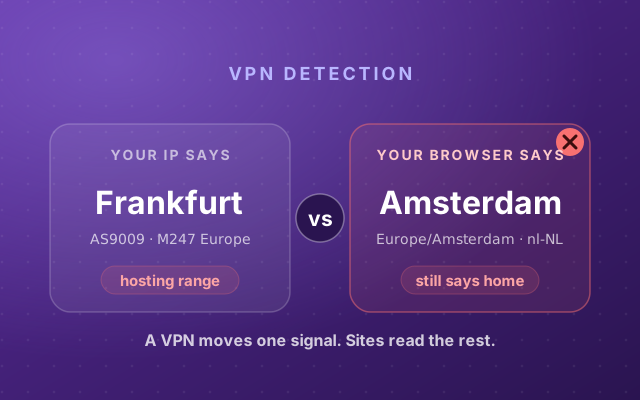
TOO_MUCH_TRAFFIC, “traffic volume from the event source is higher than normal”. Google does not say what counts as an event source, but in practice it comes down to your IP address or device. A VPN or datacenter exit shares its address with hundreds of strangers, a mobile carrier puts a town behind one address, and one scraper on it sours the number for everyone. This is the most common cause, and the one that follows you from site to site. Why you keep getting CAPTCHAs covers IP reputation in depth, and how websites detect your VPN shows what gives the exit away.UNEXPECTED_ENVIRONMENT, “the event originated from an illegitimate environment”. Emulators, automation frameworks and browsers whose built-in functions have been rewritten. Privacy extensions that spoof your canvas or randomize your fingerprint do exactly that, and the rewritten APIs are detectable in the same way stealth plugins are. To reCAPTCHA, a browser that lies about itself looks worse than a browser that is merely unusual.AUTOMATION, “the interaction matches the behavior of an automated agent”. Machine-clean input, but also no input at all: many sites request the token the moment the page loads, before you have moved the mouse, so the model is scoring a visitor who has done nothing yet.UNEXPECTED_USAGE_PATTERNS, a visit “significantly different from expected patterns” for that site. Arriving straight at a deep login URL from a cold start, submitting in under a second, hitting the same form many times.LOW_CONFIDENCE_SCORE, “too little traffic was received from this site to generate quality risk analysis”. This one is not about you at all. Google says scores “within 7 days of implementation might differ”, and a small site’s login can mis-score you with nothing on your side to fix.
Then there is recognition. reCAPTCHA sets its own cookie, and a browser it has seen before scores better than one it has not. In 2019, researchers at the University of Toronto and Télécom ParisTech who studied v3 told The Register that visiting through Tor, a proxy or a VPN lowered the score, and that visits from a signed-in Google account raised it; Google’s answer was that it does not disclose its security methods. A browser that wipes its cookies on every close is a stranger again every morning, and is scored like one.
“Always 0.9” and “always 0.1”
Developer forums are full of two complaints, and both tell a visitor something.
Sites that see 0.9 on every request, including from obvious bots, are usually new or nearly empty. Google’s published test keys are v2 keys that pass by design, and for v3 its FAQ tells developers to use a separate key for testing and warns that its scores “may not be accurate” because the model needs real traffic; the same FAQ says a v3 key that has run past its monthly quota “may fail open by returning a static score 0.9”. CleanTalk ran a Selenium bot against a fresh site for 24 hours and got 0.9 every time. So a 0.9 on a quiet site proves less than it seems.
The opposite cliff is the one that locks people out: 0.1 on every attempt. Read enough threads and they end the same way: the traffic came from a VPN, a cloud box, or a browser being driven by something. That is TOO_MUCH_TRAFFIC and UNEXPECTED_ENVIRONMENT in forum form, and retrying does not fix a reason that travels with you.
reCAPTCHA score checker: test your own score
The button at the top of this page is a score detector like the others you will find, with one difference. It loads reCAPTCHA v3 with this site’s key, asks Google for a token, and lets our server exchange it through Google’s assessment API, the path that returns the finer eleven-level score and reason codes when the key’s tier allows it. When Google attaches a reason, you see it. Other score-checker pages stop at the number.
Two caveats. The score is per site, so yours here is not your score on someone else’s login. But the inputs travel with you: a 0.1 here is a 0.1 problem everywhere. And scores move. Press “Check again” after scrolling and reading for a minute and it often climbs, because reCAPTCHA now has some behavior to look at instead of a cold start.
How to increase a low reCAPTCHA score
- Change the address first. Turn the VPN off, or switch to an exit with a better reputation, and try the login again. On a phone, try Wi-Fi instead of mobile data, or the reverse, to get out from behind a crowded carrier address. If the score jumps, you found it.
- Let the browser have a memory. Do the login in your normal window, not a fresh incognito one, and allow cookies for that site. Being signed in to a Google account helped in the 2019 tests, if that trade is one you are willing to make.
- Drop the API-rewriting extensions for that site. Canvas spoofers and fingerprint randomizers make the environment “unexpected”. An ordinary ad blocker is rarely the cause; a stealth or anti-fingerprint extension often is.
- Be a person before you submit. Give the page a few seconds, scroll, move the mouse, type the form instead of pasting it. If the site grabbed its token when the page loaded, that token lasts two minutes, so taking ten seconds is fine; a form that fills itself in a few hundred milliseconds is what a script looks like.
- If a survey or research platform rejected you, appeal. Prolific’s guidance to researchers says outright that reCAPTCHA thresholds catch real people; quote it.
- Running many accounts? Then each profile inherits the others’ reputation unless each has its own clean address and a browser that is consistent with itself. That is what Incogniton is built for: real, separate browser profiles that Google’s model scores one at a time instead of as a crowd.
Press the button, read the reason if Google gives one, fix that one thing, and check again. The full browser scan runs the VPN, automation and fingerprint checks that feed the same verdict.